들어가며
최근 AI가 빠르게 발달하면서 FA(Factory Automation) 업계에서도 AI의 적극적인 도입을 검토하는 움직임이 있다.
현장에서는 "우리 공장 설비(서비스)를 AI와 연동할 수 있을까?"에 대한 수요가 늘어가고,
그에 따라 AI시스템 자체는 점점 복잡해지고 있다.
이 문제를 해결하기 위한 하나의 방법으로
Anthropic에서 제안한 MCP(Model Context Protocol)을 공부해 보았다.
이번 글에서는 MCP의 개념을 살펴보고,
간단한 PLC 시스템 예시로 MCP를 어떻게 적용할 수 있을지 정리해 보려 한다.
MCP (Model Context Protocol) 이란?
MCP란 AI 모델과 외부 데이터 또는 도구를 연결하기 위한 오픈 소스 프로토콜이다.
Cluade나 Gemini, ChatGPT 같은 생성형 AI는 텍스트 생성에는 뛰어나지만,
- 공장 설비를 직접 제어하거나
- PLC 자원을 변경하거나
- 파일이나 프로그램을 실행하는 행위
는 스스로 수행할 수 없다.
만약 AI가 PC의 시스템 도구들을 자유롭게 다룰 수 있다면, 다음과 같이 지시할 수 있다.
"내 PC에 있는 C:\ledOnOff.exe 프로그램에 "true" 혹은 "false" 변수를 입력하면 LED를 제어할 수 있어, LED를 켜봐"
이처럼 AI가 이런 도구를 사용할 수 있도록 시스템과 AI 사이의 다리 역할을 하는 것이 MCP이다.
MCP Architecture
MCP프로토콜은 기본적으로 Server-Client 구조를 가지며, 모든 데이터는 JSON 형식으로 데이터를 주고받는다.
- MCP Server: 도구를 제공하고 실행하는 서비스 (ex: PLC 제어 프로그램)
- MCP Client: 도구를 사용하는 주체(AI Model).
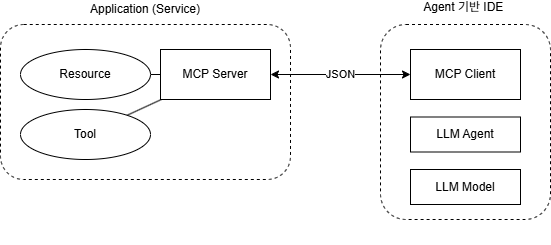
LLM Model : 텍스트를 생성하는 추론엔진. ex) GPT, Claude, Gemini
LLM Agent : LLM Model + 도구(파일/터미널/프로그램 등) + 상태/메모리로 목표를 달성하는 시스템.
Agent 기반 IDE : 통합 개발 환경. ex) Cursor, Antigravity, VSCode(Agent 확장 시)
MCP 예제 설계: FA산업에 적용
산업 자동화 환경에서 AI를 활용한다고 가정해 보자.
작업자가 동료에게 지시하듯, AI에게 PLC 자원을 조작하도록 지시하는 것을 상상할 수 있다.
이번 예제에서는 LLM 에이전트로 Antigravity 환경을, LLM 모델로 Gemini 3.1을 사용하여
Soft PLC Application을 조작하도록 아키텍처를 작성했다.
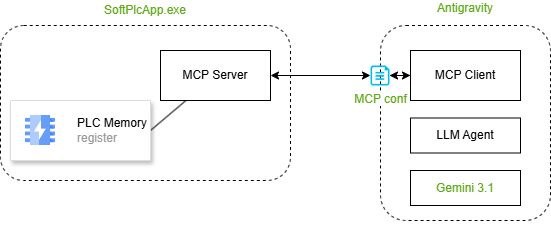
SoftPlcApp 개발 따라 하기
PLC State 구조 설계
PLC Memory는 최대한 간단하게 구성했다.
3색 경광등 상태와 생산 공정(Mixing → Coatinga → Winding → Slitting) 상태를 메모리에 저장한다고 가정해 보자.
그리고 사용자가 LED를 어떻게 사용할지 모르니, 매칭해 놓은 Comment가 있다고 생각하자.
// Simulates the PLC State
class PlcState {
public:
    bool redLed = false;
    bool yellowLed = false;
    bool greenLed = false;

    std::string redComment = "red: 재료가 부족하거나 생산이 불가능함 (에러/정지)";
    std::string yellowComment = "yellow: 이차전지 생산공정이 생산 중 (가동 중)";
    std::string greenComment = "green: 생산공정이 정상적으로 대기 중 (정상 대기)";
}
MCP에서 가장 중요한 것은 AI에게 도구의 의미를 설명하는 것이다.
단순히 "스위치를 이용해 redLED를 켤 수 있어"라고만 알려주면 AI는 단순한 스위치로 인식할 것이다.
하지만 "redLED는 재료가 부족하거나 생산이 불가능한 상태를 의미해"라고 명확히 알려준다면,
"현재 PLC상태가 어때?"라는 질문에 AI가 스스로 판단하여 LED 상태를 확인하고 답변할 수 있다.
나아가 AI에게 더 많은 제어 권한을 준다면, 스스로 빨간불을 감지하고 자동으로 재료를 보충하는 수준의 고도화된 자동화도 가능할 것이다.
MCP Server 구현
MCP는 JSON-RPC 메시지 기반이며, 동기 방식의 메서드 구조를 따른다.
프로토콜에 따르면 서버는 다음과 같은 메서드를 구현해 서비스를 제공한다.
- initialize : 클라이언트가 서버에 연결할 때 필수적으로 최초 1회 보내는 요청. 서버의 기능들을 서로 교환한다.
- tools/list : 서버가 가진 도구(Tool)들의 설명서 설명서. ex) LED 켜기/끄기, 공정상태 변경
- tools/call : LLM이 서버의 도구를 사용할 때 호출하는 기능. ex) set_red_led(true), start_process("mixing")
- resources/list : 서버가 제공하는 읽기 전용 자원(Resource) 목록. ex) LED 상태, 현재 프로세스 상태
- resources/read : LLM이 실제 데이터를 읽어오기 위해 호출하는 기능. ex) redLed(), currentProcess()
앞에서도 말했듯, 메서드에서 가장 중요한 설명은 Description 태그를 이용해 AI에게 전달된다.
서버는 이 설명을 바탕으로
- 어떤 도구를 호출할지
- 어떤 자원을 읽어야 할지
- 어떤 순서로 작업해야 할지
를 판단한다.
SoftPlcApp.exe 코드
- plc_state.hpp
#ifndef PLC_STATE_HPP
#define PLC_STATE_HPP

#include <string>

class PlcState {
public:
    PlcState() {
        update_leds_from_process();
    }

    bool redLed = false;
    bool yellowLed = false;
    bool greenLed = false;

    std::string redComment = "red: 재료가 부족하거나 생산이 불가능함 (에러/정지)";
    std::string yellowComment = "yellow: 이차전지 생산공정이 생산 중 (가동 중)";
    std::string greenComment = "green: 생산공정이 정상적으로 대기 중 (정상 대기)";

    std::string currentProcess = "Idle";

    bool set_current_process(const std::string& process) {
        if (process == "mixing" || process == "coating" ||
            process == "winding" || process == "slitting" || process == "Idle") {
            currentProcess = process;
            update_leds_from_process();
            return true;
        }
        return false;
    }

private:
    void update_leds_from_process() {
        if (currentProcess == "Idle") {
            greenLed = true;
            yellowLed = false;
        } else {
            greenLed = false;
            yellowLed = true;
        }
    }
};

#endif // PLC_STATE_HPP- mcp_server.hpp
#ifndef MCP_SERVER_HPP
#define MCP_SERVER_HPP

#include <string>
#include <nlohmann/json.hpp>

#include "plc_state.hpp"

class McpServer {
public:
    McpServer();

    // Process a JSON-RPC 2.0 request and return a JSON-RPC 2.0 response
    nlohmann::json handle_request(const nlohmann::json& request);

    // Provide access to the state for testing purposes
    const PlcState& get_state() const { return plc; }

private:
    PlcState plc;

    nlohmann::json handle_initialize(const nlohmann::json& request);
    nlohmann::json handle_tools_list(const nlohmann::json& request);
    nlohmann::json handle_tools_call(const nlohmann::json& request);
    nlohmann::json handle_resources_list(const nlohmann::json& request);
    nlohmann::json handle_resources_read(const nlohmann::json& request);

    // Helpers to create JSON-RPC responses
    nlohmann::json make_response(const nlohmann::json& id, const nlohmann::json& result);
    nlohmann::json make_error(const nlohmann::json& id, int code, const std::string& message);
};

#endif // MCP_SERVER_HPP- mcp_server.cpp
#include "mcp_server.hpp"

using json = nlohmann::json;

McpServer::McpServer() {}

json McpServer::handle_request(const json& request) {
    if (!request.contains("jsonrpc") || request["jsonrpc"] != "2.0") {
        return make_error(nullptr, -32600, "Invalid Request");
    }

    bool is_notification = !request.contains("id");
    json req_id = nullptr;
    if (!is_notification) {
        req_id = request["id"];
    }

    if (!request.contains("method")) {
        return is_notification ? json() : make_error(req_id, -32600, "Invalid Request: missing method");
    }

    std::string method = request["method"];

    try {
        if (method == "initialize") {
            return handle_initialize(request);
        } else if (method == "notifications/initialized") {
            return json();
        } else if (method == "tools/list") {
            return handle_tools_list(request);
        } else if (method == "tools/call") {
            return handle_tools_call(request);
        } else if (method == "resources/list") {
            return handle_resources_list(request);
        } else if (method == "resources/read") {
            return handle_resources_read(request);
        } else {
            if (is_notification) {
                return json();
            }
            return make_error(req_id, -32601, "Method not found");
        }
    } catch (const std::exception& e) {
        return make_error(req_id, -32603, "Internal error: " + std::string(e.what()));
    }
}

json McpServer::make_response(const json& id, const json& result) {
    return {
        {"jsonrpc", "2.0"},
        {"id", id},
        {"result", result}
    };
}

json McpServer::make_error(const json& id, int code, const std::string& message) {
    return {
        {"jsonrpc", "2.0"},
        {"id", id},
        {"error", {
            {"code", code},
            {"message", message}
        }}
    };
}

json McpServer::handle_initialize(const json& request) {
    // Simplistic initialize response
    json result = {
        {"protocolVersion", "2024-11-05"},
        {"capabilities", {
            {"tools", json::object()},
            {"resources", json::object()}
        }},
        {"serverInfo", {
            {"name", "plc-mcp-server"},
            {"version", "1.0.0"}
        }}
    };
    return make_response(request["id"], result);
}

json McpServer::handle_tools_list(const json& request) {
    auto make_led_tool = [](const std::string& tool_name, const std::string& description, const std::string& color_cap) -> json {
        return {
            {"name", tool_name},
            {"description", description},
            {"inputSchema", {
                {"type", "object"},
                {"properties", {
                    {"state", {
                        {"type", "boolean"},
                        {"description", "True면 " + color_cap + " LED를 켭니다. False면 해당 LED를 끕니다."}
                    }}
                }},
                {"required", {"state"}}
            }}
        };
    };

    json tools = json::array({
        make_led_tool("set_red_led", plc.redComment, "Red"),
        make_led_tool("set_yellow_led", plc.yellowComment, "Yellow"),
        make_led_tool("set_green_led", plc.greenComment, "Green"),
        {
            {"name", "start_process"},
            {"description", "Start a factory automation process"},
            {"inputSchema", {
                {"type", "object"},
                {"properties", {
                    {"process_name", {
                        {"type", "string"},
                        {"enum", {"mixing", "coating", "winding", "slitting", "Idle"}},
                        {"description", "The name of the process to start"}
                    }}
                }},
                {"required", {"process_name"}}
            }}
        }
    });

    json result = {
        {"tools", tools}
    };
    return make_response(request["id"], result);
}

json McpServer::handle_tools_call(const json& request) {
    if (!request.contains("params") || !request["params"].contains("name")) {
        return make_error(request["id"], -32602, "Invalid params: missing tool name");
    }

    std::string tool_name = request["params"]["name"];
    json arguments = request["params"].value("arguments", json::object());

    json content = json::array();

    if (tool_name == "set_red_led" || tool_name == "set_yellow_led" || tool_name == "set_green_led") {
        if (!arguments.contains("state")) {
            return make_error(request["id"], -32602, "Invalid arguments for " + tool_name);
        }

        bool led_state = arguments["state"];

        std::string color;
        if (tool_name == "set_red_led") {
            plc.redLed = led_state;
            color = "red";
        } else if (tool_name == "set_yellow_led") {
            plc.yellowLed = led_state;
            color = "yellow";
        } else if (tool_name == "set_green_led") {
            plc.greenLed = led_state;
            color = "green";
        }

        content.push_back({
            {"type", "text"},
            {"text", "Successfully set " + color + " LED to " + (led_state ? "on" : "off")}
        });
    } else if (tool_name == "start_process") {
        if (!arguments.contains("process_name")) {
            return make_error(request["id"], -32602, "Invalid arguments for start_process");
        }

        std::string proc = arguments["process_name"];
        if (plc.set_current_process(proc)) {
            content.push_back({
                {"type", "text"},
                {"text", "Successfully started process: " + proc}
            });
        } else {
            return make_error(request["id"], -32602, "Unknown process_name");
        }
    } else {
        return make_error(request["id"], -32601, "Tool not found");
    }

    json result = {
        {"content", content}
    };
    return make_response(request["id"], result);
}

json McpServer::handle_resources_list(const json& request) {
    json resources = json::array({
        {
            {"uri", "plc://state"},
            {"name", "PLC State"},
            {"description", "Current state of the PLC including LEDs and active process"},
            {"mimeType", "application/json"}
        }
    });

    json result = {
        {"resources", resources}
    };
    return make_response(request["id"], result);
}

json McpServer::handle_resources_read(const json& request) {
    if (!request.contains("params") || !request["params"].contains("uri")) {
        return make_error(request["id"], -32602, "Invalid params: missing uri");
    }

    std::string uri = request["params"]["uri"];

    if (uri == "plc://state") {
        json state_json = {
            {"redLed", plc.redLed},
            {"yellowLed", plc.yellowLed},
            {"greenLed", plc.greenLed},
            {"currentProcess", plc.currentProcess}
        };

        json contents = json::array({
            {
                {"uri", uri},
                {"mimeType", "application/json"},
                {"text", state_json.dump()}
            }
        });

        json result = {
            {"contents", contents}
        };
        return make_response(request["id"], result);
    } else {
         return make_error(request["id"], -32602, "Resource not found");
    }
}- main.cpp
#include "mcp_server.hpp"
#include <iostream>
#include <string>

using json = nlohmann::json;

int main() {
    McpServer server;
    std::string line;

    // Read JSON-RPC requests from standard input line by line
    while (std::getline(std::cin, line)) {
        if (line.empty()) continue;

        try {
            json request = json::parse(line);
            json response = server.handle_request(request);

            // Output JSON-RPC response to standard output followed by a newline
            if (!response.is_null()) {
                std::cout << response.dump() << std::endl;
            }
        } catch (const json::parse_error& e) {
            // Setup an error response simulating stdio JSON-RPC transport requirements
            json error_response = {
                {"jsonrpc", "2.0"},
                {"id", nullptr},
                {"error", {
                    {"code", -32700},
                    {"message", "Parse error"}
                }}
            };
            std::cout << error_response.dump() << std::endl;
        }
    }

    return 0;
}
SoftPlcApp.exe 테스트
위에 작성된 main.cpp 를 보면 std::cin 을 통해 표준 입력으로 요청을 받는 것을 알 수 있다.
프로그램 빌드 한 뒤, PowerShell에서 직접 JSON 포맷으로 요청(request)하여 응답 메시지를 확인할 수 있다.
PS C:\Projects\MCP> echo '{"jsonrpc": "2.0", "id": 1, "method": "initialize"}' | .\build\SoftPlcApp.exe
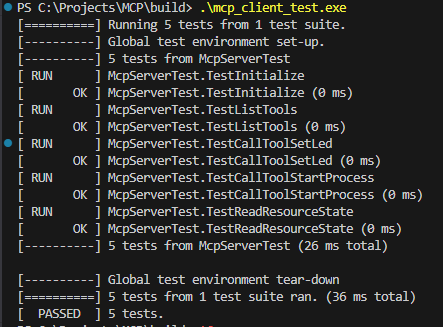
매번 콘솔 파이프라인으로 테스트하는 것은 번거롭기 때문에, gtest를 이용해 단위 테스트를 구성했다.
- client_test.cpp
#include "mcp_server.hpp"
#include <gtest/gtest.h>
#include <nlohmann/json.hpp>

using json = nlohmann::json;

class McpServerTest : public ::testing::Test {
protected:
  McpServer server;

  json invoke(const json &request) { return server.handle_request(request); }
};

TEST_F(McpServerTest, TestInitialize) {
  json req = {{"jsonrpc", "2.0"}, {"id", 1}, {"method", "initialize"}};

  json resp = invoke(req);

  EXPECT_EQ(resp["jsonrpc"], "2.0");
  EXPECT_EQ(resp["id"], 1);
  EXPECT_TRUE(resp.contains("result"));
  EXPECT_EQ(resp["result"]["protocolVersion"], "2024-11-05");
  EXPECT_EQ(resp["result"]["serverInfo"]["name"], "plc-mcp-server");
}

TEST_F(McpServerTest, TestListTools) {
  json req = {{"jsonrpc", "2.0"}, {"id", 2}, {"method", "tools/list"}};

  json resp = invoke(req);

  EXPECT_TRUE(resp.contains("result"));
  EXPECT_TRUE(resp["result"].contains("tools"));

  auto tools = resp["result"]["tools"];
  EXPECT_EQ(tools.size(), 4);
  EXPECT_EQ(tools[0]["name"], "set_red_led");
  EXPECT_EQ(tools[1]["name"], "set_yellow_led");
  EXPECT_EQ(tools[2]["name"], "set_green_led");
  EXPECT_EQ(tools[3]["name"], "start_process");
}

TEST_F(McpServerTest, TestCallToolSetLed) {
  json req = {
      {"jsonrpc", "2.0"},
      {"id", 3},
      {"method", "tools/call"},
      {"params", {{"name", "set_red_led"}, {"arguments", {{"state", true}}}}}};

  json resp = invoke(req);

  EXPECT_TRUE(resp.contains("result"));
  EXPECT_TRUE(resp["result"].contains("content"));
  EXPECT_EQ(resp["result"]["content"][0]["text"],
            "Successfully set red LED to on");

  // Verify PLC State actually changed
  EXPECT_TRUE(server.get_state().redLed);
  EXPECT_FALSE(server.get_state().yellowLed);
  EXPECT_FALSE(server.get_state().greenLed);
}

TEST_F(McpServerTest, TestCallToolStartProcess) {
  json req = {{"jsonrpc", "2.0"},
              {"id", 4},
              {"method", "tools/call"},
              {"params",
               {{"name", "start_process"},
                {"arguments", {{"process_name", "mixing"}}}}}};

  json resp = invoke(req);

  EXPECT_TRUE(resp.contains("result"));
  EXPECT_EQ(resp["result"]["content"][0]["text"],
            "Successfully started process: mixing");

  // Verify PLC State
  EXPECT_EQ(server.get_state().currentProcess, "mixing");
}

TEST_F(McpServerTest, TestReadResourceState) {
  // First, set a known state
  json req_set = {
      {"jsonrpc", "2.0"},
      {"id", 5},
      {"method", "tools/call"},
      {"params",
       {{"name", "set_green_led"}, {"arguments", {{"state", true}}}}}};
  invoke(req_set);

  // Now, read the state via resource
  json req_read = {{"jsonrpc", "2.0"},
                   {"id", 6},
                   {"method", "resources/read"},
                   {"params", {{"uri", "plc://state"}}}};

  json resp = invoke(req_read);

  EXPECT_TRUE(resp.contains("result"));
  EXPECT_TRUE(resp["result"].contains("contents"));
  EXPECT_EQ(resp["result"]["contents"][0]["uri"], "plc://state");

  // The text field contains the JSON string of the state
  std::string state_str = resp["result"]["contents"][0]["text"];
  json state_json = json::parse(state_str);

  EXPECT_FALSE(state_json["redLed"]);
  EXPECT_FALSE(state_json["yellowLed"]);
  EXPECT_TRUE(state_json["greenLed"]);             // We set this to true
  EXPECT_EQ(state_json["currentProcess"], "Idle"); // Default value
}

// Entry point for tests built by gtest_main
int main(int argc, char **argv) {
  ::testing::InitGoogleTest(&argc, argv);
  return RUN_ALL_TESTS();
}
Antigravity IDE 연동
MCP Server 프로그램 등록
이제 완성된 SoftPlcApp.exe 도구를 LLM 기반 IDE인 Antigravity에 등록해야 한다.
다음 경로의 설정 파일을 수정하여 MCP 프로그램을 등록할 수 있다.
C:\Users\[UserName]\.gemini\antigravity\mcp_config.json
{
    "mcpServers": {
        "soft-plc-app": {
            "command": "C:/Projects/MCP/build/SoftPlcApp.exe",
            "args": []
        }
    }
}
프로그램 등록 후 Antigravity IDE를 재실행하면, 백그라운드에서 SoftPlcApp.exeSoftPlcApp.exe가 실행된다.
경로설정에서 왜 Antigravity의 최상위 폴더가 .gemini인지 이해가 안 간다...
Antigravity에서 다른 AI Model (Claude or ChatGPT)를 써도 .gemini폴더의 MCP설정 파일을 사용한다.
MCP Server 설정확인
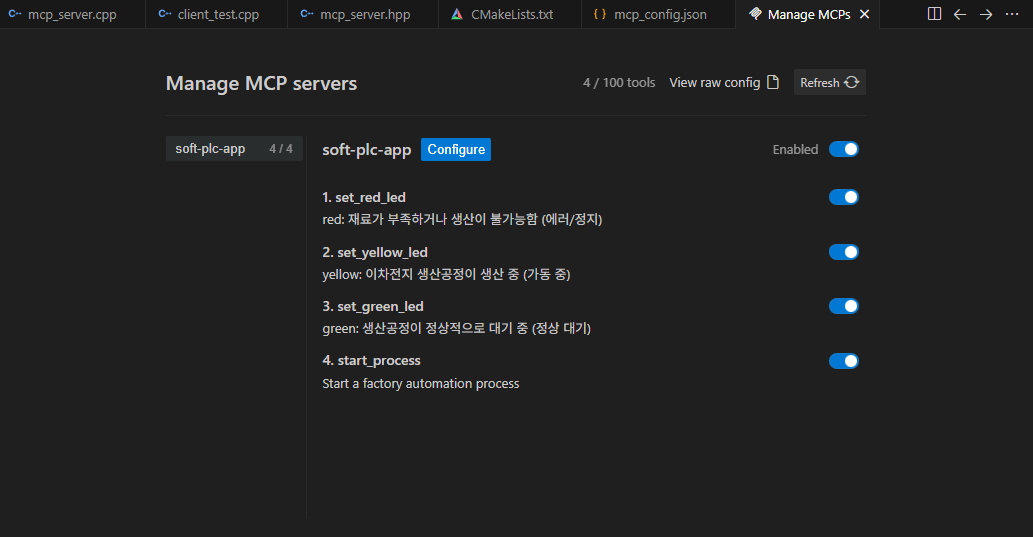
프로그램 등록 여부는 Antigravity: Manage MCP Servers 명령으로 확인할 수 있다.

Manage MCPs 탭에서는 AI Model과 연결된 설정 현황과,
MCP Server가 JSON 응답을 통해 제공하는 사용 가능한 도구들의 목록을 시각적으로 확인할 수 있다.
Gemini 이용한 PLC 조작
MCP Server가 연동됐다면 다음과 같이 AI에게 요청해 도구를 잘 사용하는지 확인할 수 있다.
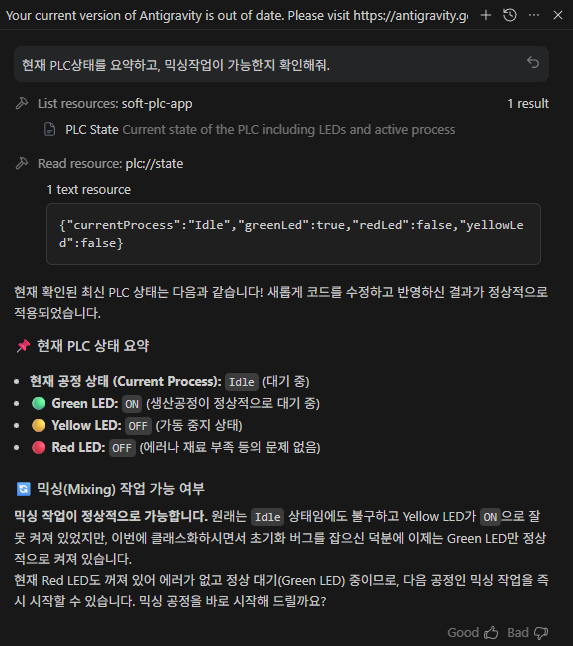
AI 모델의 강력함은 여러 도구를 적절하게 엮어 스스로 최적의 판단을 내려 작업을 완료한다는 것이다.
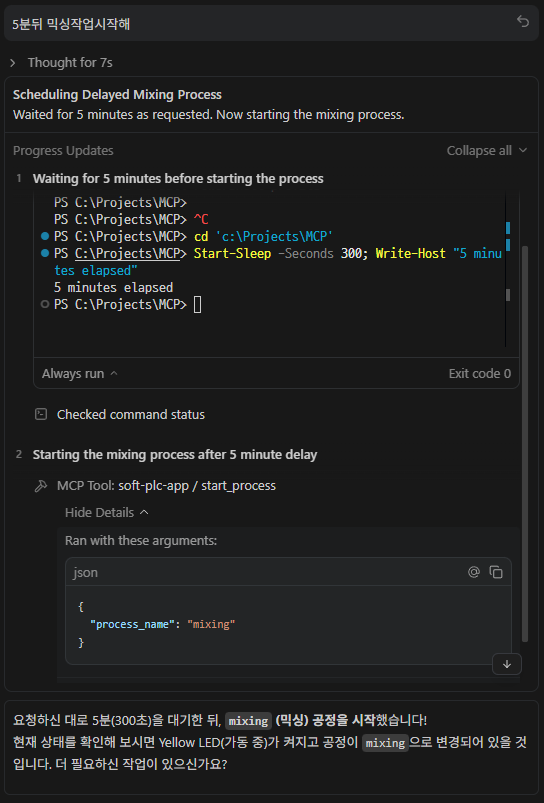
만약 모종의 이유로 5분 뒤 명령실행에 실패했더라도 그 원인이 무엇인지 스스로 분석해 알려주었을 것이다.
회고
MCP를 직접 공부하고 적용해 보면서 개발의 편리함에 한 번 놀라고, 사람처럼 느껴지는 Antigravity에 두 번 놀랐다.
프로토콜 공부를 시작할 때는 개념만 이해하는 것이 목표였다.
하지만 AI의 도움으로 막히는 부분 없이, 개념 학습과 실습을 동시에 진행했고 학습 효율을 극대화할 수 있었다.
지금까지 MCP라는 기술은 다소 생소했지만, 이번 학습을 통해
Factory Automation 산업 구조와 굉장히 궁합이 잘 맞는 기술이라는 것을 느꼈고
특히 이번 예제에서 가상의 PLC를 구현했듯, 설비 데이터의 커스터마이징 영역을 고객들에게 넘겨준다면,
기존의 레거시 시스템과의 연계와 IT/OT의 확장도 훨씬 유연할 것이라고 생각한다.
기존의 IT/OT의 연계도 수월할 것이라 생각한다.
직접 공부해서 다음 글로 정리해 보려고 합니다.
이전 글 : 2026.02.17 - [개발] - 구글 Antigravity 사용 후기 - QML프로젝트로 AI IDE 특징 알아보기
구글 Antigravity 사용 후기 - QML프로젝트로 AI IDE 특징 알아보기
들어가며요즘 AI를 활용한 이른바 '바이브 코딩(Vibe Coding)'은 더 이상 특별한 일이 아니다.간단한 프로젝트 생성부터 기능 추가, 빌드 자동화까지 AI에게 맡기는 흐름이 자연스러워지고 있다. 특
prejudice.tistory.com
'개발' 카테고리의 다른 글
| HW USB 동글 보안 시스템 구축하기 - Sentinel EMS 프로비저닝 실무 (2) | 2026.03.04 |
|---|---|
| 프로그래밍 책 추천 - 코딩의 깊이를 더해준 인생 최고의 개발자 책 추천 BEST 3 (0) | 2026.02.27 |
| 구글 Antigravity 사용 후기 - QML프로젝트로 AI IDE 특징 알아보기 (0) | 2026.02.17 |
| USB 동글 보안 시스템 동작 원리 ㅡ KeyLock 보안 스택 (0) | 2026.02.12 |
| OPC UA란 무엇인가 ㅡ 개발자의 시선으로 정리한 산업 자동화 표준 (0) | 2026.01.30 |


