들어가며
지난 글에서는 USB 동글 보안의 원리를 학습하고, Sentinel EMS를 통해 USB 동글을 프로비저닝 하는 과정을 다뤘다.
이번 글에서는 해당 동글을 제어하는 C++ Class를 설계하고,
실제 Software PLC 시스템에 적용할 USB 동글 기반 라이선스 인증 기능을 구현해 보려 한다.
2026.03.04 - [개발] - HW USB 동글 보안 시스템 구축하기 - Sentinel EMS 프로비저닝 실무
HW USB 동글 보안 시스템 구축하기 - Sentinel EMS 프로비저닝 실무
들어가며지난 글에서 USB 동글 보안 원리를 학습하고, Sentinel 동글 솔루션의 구조를 분석했다.이번 글에서는 한 단계 더 나아가 실제 Sentinel USB 동글에 라이선스 정보를 저장해 보려고 한다. 최종
prejudice.tistory.com
SW 요구사항 정리
개발에 앞서 이번 라이선스 인증 모듈에서 처리해야 할 핵심 소프트웨어 요구사항은 다음과 같다.
- ☑ HMI 서비스: FeatureID 1 사용
- ☑ PLC(MuLiN) 서비스: FeatureID 2 사용
- ☑ 통합 동글 지원: Feature1과 Feature2가 함께 존재하면 HMI + PLC 통합 라이선스로 동작
- ☐
PLC 서비스만의고유 데이터 저장(후순위 고려)
메모리 구조 및 클래스 설계
Sentinel USB 동글은 내부에 고유한 구조로 메모리가 저장된다.
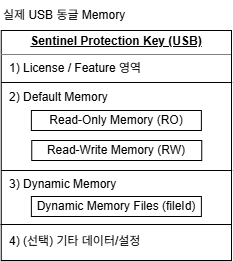
그리고 Sentinel의 보안 스택을 살펴보면,
Application Area와 RTE(Runtime Environment)가 분리되어 있는 Server-Client 구조임을 알 수 있다.
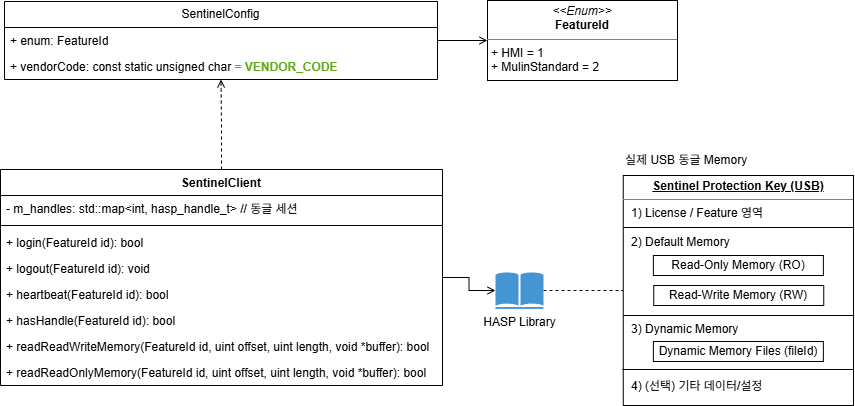
Sentinel API가 FeatureID 단위로 로그인 세션을 관리하는것을 확인해,
이를 바탕으로 통합 제어가 가능한 C++ 클래스를 설계했다.
클래스의 주요 역할
☑ HMI와 PLC 서비스의 FeatureID 구분 및 관리
☑ 사내 고유 VENDOR_CODE의 안전한 저장
☑ Sentinel API 호출 래핑 (로그인, 로그아웃, 메모리 제어 등)
SentinelClient C++ 클래스 구현
동글 제어의 핵심인 SentinelClient 클래스 이다.
Sentinel API의 x64 라이브러리 파일은 Sentinel EMS-Developer-RTE Installer 에서 다운로드할 수 있다.
현재 개발 중인 프로젝트는 MinGW 32bit 컴파일러를 사용하고 있으므로, 구버전 라이브러리를 사용하여 구현할 수 있었다.
📦SentinelClient
┃ 📜SentinelClient.cpp
┃ 📜SentinelClient.h
┣ 📂include
┃ ┗ 📜hasp_api.h
┗ 📂lib
  ┣ 📜hasp_windows_109675.dll
  ┗ 📜hasp_windows_109675.lib
SentinelClient.h
#pragma once

#include "include/hasp_api.h"
#include <map>

namespace Sentinel {
enum FeatureID {
  HMI = 1,
  MulinStandard = 2,
};

const static unsigned char vendorCode[] =
    "[Private Vendor Code...]";

class SentinelClient {
public:
  SentinelClient();
  ~SentinelClient();

  bool login(FeatureID id);
  void logout(FeatureID id);
  bool hasHandle(FeatureID id) const;
  bool checkAlive(FeatureID id);

  bool readReadWriteMemory(FeatureID id, unsigned int offset, unsigned int length, void *buffer);
  bool readReadOnlyMemory(FeatureID id, unsigned int offset, unsigned int length, void *buffer);

private:
  std::map<FeatureID, hasp_handle_t> m_handles;
};

} // namespace Sentinel
SentinelClient.cpp
#include "SentinelClient.h"
#include <iostream>

using namespace Sentinel;

SentinelClient::SentinelClient() {}

SentinelClient::~SentinelClient() {
  for (auto it = m_handles.begin(); it != m_handles.end();) {
    hasp_logout(it->second);
    it = m_handles.erase(it);
  }
}

bool SentinelClient::login(FeatureID id) {
  if (hasHandle(id)) {
        return true;
  }

  hasp_handle_t handle;
  const hasp_status_t status = hasp_login(id, vendorCode, &handle);

  if (status == HASP_STATUS_OK) {
    m_handles.emplace(id, handle);
    return true;
  }

  return false;
}

void SentinelClient::logout(FeatureID id) {
  if (!hasHandle(id)) {
    return;
  }
  hasp_logout(m_handles[id]);
  m_handles.erase(id);
}

bool SentinelClient::hasHandle(FeatureID id) const { return m_handles.find(id) != m_handles.end(); }

bool SentinelClient::checkAlive(FeatureID id) {
  if (!hasHandle(id)) {
    return false;
  }

  unsigned char buf[16] = {0};
  const hasp_status_t status = hasp_encrypt(m_handles.find(id)->second, buf, sizeof(buf));

  if (status == HASP_STATUS_OK) {
    return true;
  }

  logout(id);
  return false;
}

bool SentinelClient::readReadWriteMemory(FeatureID id, unsigned int offset, unsigned int length, void *buffer) {
  if (!hasHandle(id)) {
    return false;
  }

  const hasp_status_t status = hasp_read(m_handles[id], HASP_FILEID_RW, offset, length, buffer);

  if (status == HASP_STATUS_OK) {
    return true;
  } else {
    std::cerr << "Sentinel Read Failed. Error Code: " << status << std::endl;
    return false;
  }
}

bool SentinelClient::readReadOnlyMemory(FeatureID id, unsigned int offset, unsigned int length, void *buffer) {
  if (!hasHandle(id)) {
    return false;
  }

  const hasp_status_t status = hasp_read(m_handles[id], HASP_FILEID_RO, offset, length, buffer);

  if (status == HASP_STATUS_OK) {
    return true;
  } else {
    std::cerr << "Sentinel Read Failed. Error Code: " << status << std::endl;
    return false;
  }
}
GoogleTest를 활용한 Unit Test 검증
하드웨어(USB 동글)에 직접 의존성을 가지는 API이므로,
코드의 신뢰성을 높이기 위해 GoogleTest를 이용해 유닛 테스트를 작성했다.
클래스의 목적과 역할이 분명하기 때문에, AI의 도움으로 테스트 코드를 빠르게 작성할 수 있었다.
테스트 전제 조건
하드웨어 동글 기반 API 테스트이기 때문에, PC와 연결된 HW 동글 상태에 따라 결과가 다르게 나온다.
1. Sentinel USB 동글의 연결 유무
2. 동글 내부에 발급된 Feature Key의 존재 유무
📦SentinelClient
┗ 📂tests
  ┣ 📜CMakeLists.txt
  ┗ 📜SentinelClientTest.cpp
CMakeLists.txt
cmake_minimum_required(VERSION 3.10)
project(SentinelClientTests)

# Use C++17
set(CMAKE_CXX_STANDARD 17)
set(CMAKE_CXX_STANDARD_REQUIRED ON)
set(CMAKE_EXPORT_COMPILE_COMMANDS ON)

# Configure googletest from local directory
include(../../googletest/googletest.cmake)

# Add the test executable
add_executable(SentinelClientTests
    SentinelClientTest.cpp
    ../SentinelClient.cpp
)

# Include directories
target_include_directories(SentinelClientTests PRIVATE
    ${CMAKE_CURRENT_SOURCE_DIR}/..
    ${CMAKE_CURRENT_SOURCE_DIR}/../include
)

# Link libraries
target_link_libraries(SentinelClientTests PRIVATE
    gtest
    gtest_main
    "${CMAKE_CURRENT_SOURCE_DIR}/../lib/hasp_windows_109675.lib"
)

# For MinGW: statically link the standard libraries to avoid missing DLL errors at runtime (0xc0000135)
if(MINGW)
    target_link_options(SentinelClientTests PRIVATE -static -static-libgcc -static-libstdc++)
endif()

# Copy the required DLL to the output directory so the test can run
add_custom_command(TARGET SentinelClientTests POST_BUILD
    COMMAND ${CMAKE_COMMAND} -E copy_if_different
        "${CMAKE_CURRENT_SOURCE_DIR}/../lib/hasp_windows_109675.dll"
        $<TARGET_FILE_DIR:SentinelClientTests>
)

# Add test
include(GoogleTest)
gtest_discover_tests(SentinelClientTests
    PROPERTIES ENVIRONMENT "PATH=${CMAKE_CURRENT_SOURCE_DIR}/../lib;$ENV{PATH}"
)
SentinelClientTest.cpp
#include "../SentinelClient.h"
#include <gtest/gtest.h>

using namespace Sentinel;

TEST(SentinelClientTest, InitializationTest) {
  SentinelClient client;
  EXPECT_FALSE(client.hasHandle(MulinStandard)); // Should not be logged in initially
}

TEST(SentinelClientTest, CheckLogin) {
  SentinelClient client;
  bool plcResult = client.login(MulinStandard);
  std::cout << "PLC Login Result: " << plcResult << std::endl;

  bool hmiResult = client.login(HMI);
  std::cout << "HMI Login Result: " << hmiResult << std::endl;
}

TEST(SentinelClientTest, LoginLogoutTest) {
  SentinelClient client;
  bool plcResult = client.login(MulinStandard);

  bool plcCheckResult = client.checkAlive(MulinStandard);
  EXPECT_TRUE(plcCheckResult);

  if (plcResult) {
    EXPECT_TRUE(plcResult);
    client.logout(MulinStandard);
    EXPECT_FALSE(client.hasHandle(MulinStandard));
  }
}

TEST(SentinelClientTest, ReadTest) {
  SentinelClient client;
  bool result = client.login(MulinStandard);
  if (result) {
    unsigned char buffer[16] = {0};
    bool readSuccess = client.readReadWriteMemory(MulinStandard, 0, 16, buffer);
    EXPECT_TRUE(readSuccess);
    if (readSuccess) {
      std::cout << "Read Data (16 bytes at offset 0): ";
      for (int i = 0; i < 16; ++i) {
        printf("%02X ", buffer[i]);
      }
      std::cout << std::endl;
    }
    client.logout(MulinStandard);
  } else {
    GTEST_SKIP() << "Login failed. Sentinel Dongle may not be connected.";
  }
}
Unit Test 결과
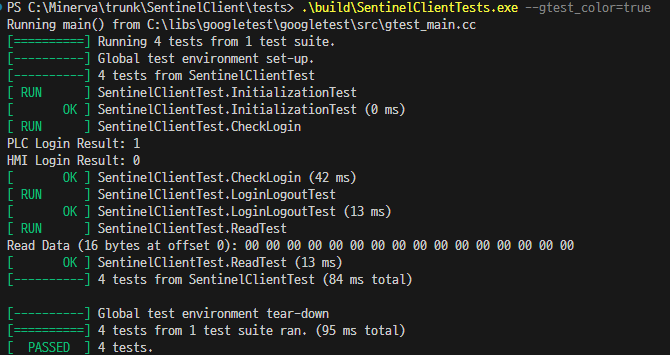
기존에 프로비저닝 해둔 MuLiN (PLC) 라이선스 동글을 꽂고 테스트 시 유닛 테스트를 통과하는 것을 확인했고,
이를 기반으로 HMI 동글만 있는 경우, 둘 다 꽂혀있는 경우, 하나도 없는 경우 등 다양한 지 케이스에 대한 검증을 마쳤다.
Qt 연동 중 발견한 버그와 해결 과정 (Troubleshooting)
유닛 테스트 통과 후, 실제 애플리케이션과 결합하기 위해 QObject를 상속받는 LicenseManage 클래스를 추가했다.
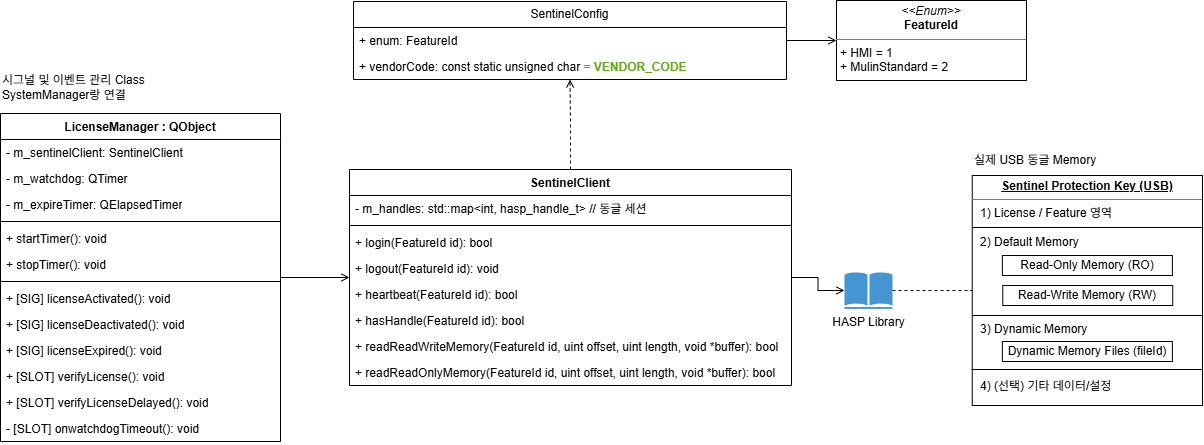
그리고 물리적인 USB 탈착 시 실시간으로 라이선스를 재검증하기 위해 Windows 이벤트 콜백과 LicenseManager::verifyLicense() 함수를 Signal/Slot으로 연결했다.
QObject::connect(&usbNotifyWindow, SIGNAL(deviceArrived()), g_licenseManager, SLOT(verifyLicense()));
QObject::connect(&usbNotifyWindow, SIGNAL(deviceRemoved()), g_licenseManager, SLOT(verifyLicense()));
연동 테스트 도중 라이선스 검증이 실패하는 버그를 발견할 수 있었다.
| 버그명 | USB 이벤트 직후 라이선스 검증 실패 |
| 원인 | Windows 장치 콜백 이벤트가 Sentinel RTE 엔진보다 빨리 발생함 |
| 문제 | 장치 인식 완료 전에 verifyLicense()가 호출될 수 있음 |
| 영향 | 정상 USB 동글이 "동글없음"으로 오인식 발생 |
| 대응 | 윈도우 이벤트 발생 후 500ms 지연 후 검증 수행 |
해당 버그는 LicenseManager::verifyLicenseDelayed() 지연시간을 부여하는 방식으로 해결할 수 있었다.
LicenseManager.h
#ifndef LICENSEMANAGER_H
#define LICENSEMANAGER_H
#include <QObject>
#include <QTimer>
#include <QElapsedTimer>
#include "SentinelClient.h"
class LicenseManager : public QObject
{
Q_OBJECT
public:
explicit LicenseManager(QObject *parent = nullptr);
void startTimer();
void stopTimer();
signals:
void licenseActivated();
void licenseDeactivated();
void licenseExpired();
public slots:
void verifyLicense();
void verifyLicenseDelayed(); // USB인식을 위해, 500ms 대기후 라이선스를 실행
private slots:
void onWatchdogTimeout();
private:
static const quint64 k_interval = 30* 60 * 1000; // 라이선스 검사 주기
static const quint64 k_expire = 30 * 60 * 1000; // 라이선스가 없을 때 유지시간
Sentinel::SentinelClient m_sentinelClient;
QTimer m_watchdog;
QElapsedTimer m_expireTimer;
bool tryLicenseLogin();
};
extern LicenseManager* g_licenseManager;
#endif // LICENSEMANAGER_H
LicenseManager.cpp
#include "LicenseManager.h"

using namespace Sentinel;

LicenseManager* g_licenseManager = NULL;

LicenseManager::LicenseManager(QObject *parent) :
    QObject(parent)
{
    m_watchdog.setInterval(k_interval);
    connect(&m_watchdog, &QTimer::timeout, this, &LicenseManager::onWatchdogTimeout);
}

void LicenseManager::startTimer()
{
    m_watchdog.start();
    verifyLicense();
}

void LicenseManager::stopTimer()
{
    m_watchdog.stop();
}

void LicenseManager::verifyLicense()
{
    if (tryLicenseLogin()) {
        if (m_expireTimer.isValid()) {
            m_expireTimer.invalidate();
            emit licenseActivated();
        }
    } else {
        if (!m_expireTimer.isValid()) {
            m_expireTimer.start();
            emit licenseDeactivated();
        } else {
            if (m_expireTimer.hasExpired(k_expire)) {
                emit licenseExpired();
            }
        }
    }

    if (m_watchdog.isActive()) {
        m_watchdog.start();
    }
}

void LicenseManager::verifyLicenseDelayed()
{
    QTimer::singleShot(500, this, SLOT(verifyLicense()));
}

void LicenseManager::onWatchdogTimeout()
{
    verifyLicense();
}

bool LicenseManager::tryLicenseLogin()
{
    if (m_sentinelClient.hasHandle(FeatureID::MulinStandard)) {
        return m_sentinelClient.checkAlive(FeatureID::MulinStandard);
    }

    return m_sentinelClient.login(FeatureID::MulinStandard);
}
회고
Sentinel API를 래핑 하는 C++ 클래스 설계부터 GoogleTest 검증, 실제 Qt 프로젝트 연동 중 발생하는 타이밍 이슈까지 다뤘다.
이번 개발을 진행하면서 범용성을 갖는 구조와 메모리 후킹 또는 오작동이 없도록 노력했다.
난이도 자체는 높지 않았지만 USB 동글 메모리 구조와 보안 스택에 대해 새롭게 배웠고,
Sentinel EMS를 통한 라이선스 프로비저닝 방식은 산업용 소프트웨어 배포 구조에서 좋은 레퍼런스로 보인다.
직접 공부해서 다음 글로 정리해 보려고 합니다.
이전글: 2026.02.12 - [개발] - USB 동글 보안 시스템 동작 원리 ㅡ KeyLock 보안 스택
USB 동글 보안 시스템 동작 원리 ㅡ KeyLock 보안 스택
들어가며이번 프로젝트가 Open Beta 출시를 앞두고, HW USB 동글을 활용한 보안 기능 개발을 담당하게 되었다. 프로젝트는 MuLiN이라는 SW PLC로,WindowsLinuxARM 기반 HW환경에서 동작하며,USB 동글이 꽂혀
prejudice.tistory.com
이전 글: 2026.03.04 - [개발] - HW USB 동글 보안 시스템 구축하기 - Sentinel EMS 프로비저닝 실무
HW USB 동글 보안 시스템 구축하기 - Sentinel EMS 프로비저닝 실무
들어가며지난 글에서 USB 동글 보안 원리를 학습하고, Sentinel 동글 솔루션의 구조를 분석했다.이번 글에서는 한 단계 더 나아가 실제 Sentinel USB 동글에 라이선스 정보를 저장해 보려고 한다. 최종
prejudice.tistory.com
'개발' 카테고리의 다른 글
| Real-Time, RTOS, PREEMPT_RT, CPU Isolation 개념 정복 - 실시간 처리 (0) | 2026.03.19 |
|---|---|
| HW USB 동글 보안 시스템 구축하기 - Sentinel EMS 프로비저닝 실무 (2) | 2026.03.04 |
| 프로그래밍 책 추천 - 코딩의 깊이를 더해준 인생 최고의 개발자 책 추천 BEST 3 (0) | 2026.02.27 |
| AI와 공장 자동화(FA)연동 따라하기 - PLC 예제로 구현한 MCP (0) | 2026.02.26 |
| 구글 Antigravity 사용 후기 - QML프로젝트로 AI IDE 특징 알아보기 (0) | 2026.02.17 |


